Showing posts with label writing tools. Show all posts

Sunday, 2 December 2012

In Praise of the Typewriter


A few months ago I bought a manual typewriter.  I remember my mother's enormous and frankly horrific electric Adler office machine way back, which shook the dining room with its carriage return - and a small blue manual in a grey hard case with gingham lining that I used to write spy codes on when I was very small... my sister had a Red Fox, a plastic-bodied model from W H Smith.  There was nothing majestic or mysterious about typewriters twenty or thirty years ago - there was nothing escapist about them, nothing obscure, nothing recherché, nothing deliberately aimed at removing oneself from the current trends in the technology of writing.  They were the current trend, though computers were beginning to appear on the home market and even the humble Sinclair ZX Spectrum pretended to the dizzy heights of professionalism:


Well, we got rid of those machines and I moved on to those all-in-one word-processor/printer units that looked like them, and then on to Windows and Word.  Progress?  Perhaps.

After a few upgrades, downgrades and side-grades (more on which in a later post), and copious amounts of hand-written drafts, I fancied a change.  Internet to the rescue - I snagged an Olivetti Lettera 35 for less than a tenner in excellent condition, loaded with a ribbon, and with its hard carry-case.  One trip to Halifax later, and here we are:


It's a nice machine.  I have very little to compare except memory, but it's easy to type on, makes all the right noises, and it's very satisfying indeed to pull a full sheet from the roller and lay it to one side, done.

To write this way is an interesting exercise in self-control.  Computers encourage an endlessly-rewritable text, one in a constant state of flux, one that is never even drafted so much as evolved in the same place constantly - every piece of work written on the computer is a palimpsest, but one with no inherent superiority over its predecessors.  There is no evolutionary evidence when working on a computer - no pile of erroneous cast-offs with which one can judge progress.  No map, only a present location.

Typing is different.  Typing is ever forwards.  There are no erase, undo, copy and paste - no corrective (let alone auto-corrective) behaviour without serious effort (Tipp-ex, anyone?).  To type is to engage fully with the act of writing - to type is to make writing.  To type is to see where you have been, from start to finish, and to know that whatever you write, it remains embedded in the archaeological srata of the work of its time.  To read a typed draft is to trace a journey, not just gaze at a space that may or may not be the desired one.

In this, typing shares something with handwriting.  Drafting in pencil or ink is to really forge something that is a kind of embodiment of the person writing it.  I have written about this before so will avoid repetition here - but the nature of physical contact with material and the ease of making adjustments, marginalia, and annotations gives writing greater freedom than when merely blackening pixels on a screen.

Even today, some well-known authors use typewriters.  To do so makes one not wilfully perverse, nor a neo-Luddite, nor a throwback.  To type need not be some faddish retro chic, some quirk of style that has no root cause beyond the desire to appear one way or another.  To type, for the best reasons, is to be, simply, a writer - and, simply, to write.

***

Recently the last British typewriter rolled out of the Brother factory - apparently they were selling around 30 per week by the end of 2012.  Still a respectable number, I think, given the way computers - desktops, laptops, tablets, smartphones - have swamped our lives and become absolutely normative in so many respects.

BBC News item
BBC News video item
BBC Radio interview with the writer Paul Bailey

And you can still get ribbons...

Saturday, 9 June 2012

In Praise of Simplicity


I'm typing this on a small, light, thin device that is approximately the size and weight of a picture book - maybe, for those who remember such things, a late 1970s Dr. Who annual or Asterix hardback.

[Rolf Harris voice] D'you know what it is yet?

It has good battery life, turns on quickly and shuts down instantly.  It can be hooked up to a desktop computer so I can work on my files in a more in-depth way more easily on a larger screen.

Rolf again.  Any ideas?

Spoiler: it's not an iPad.

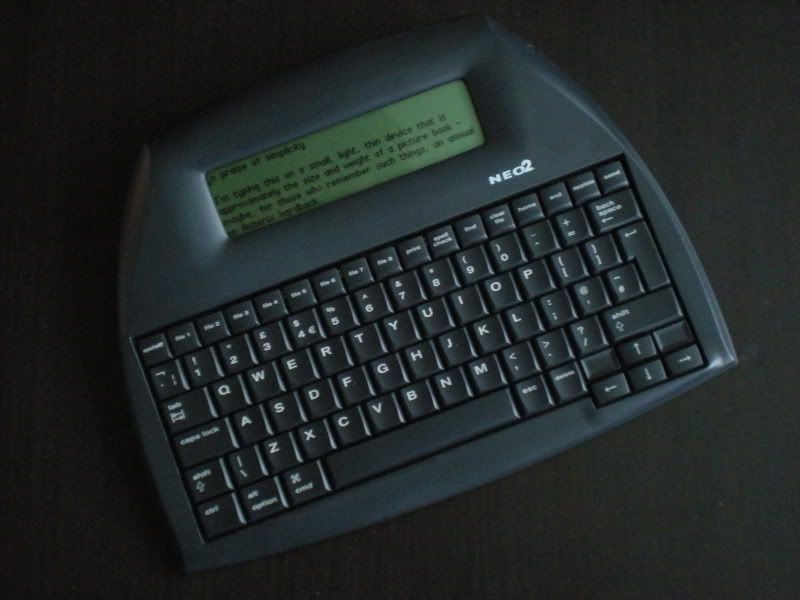
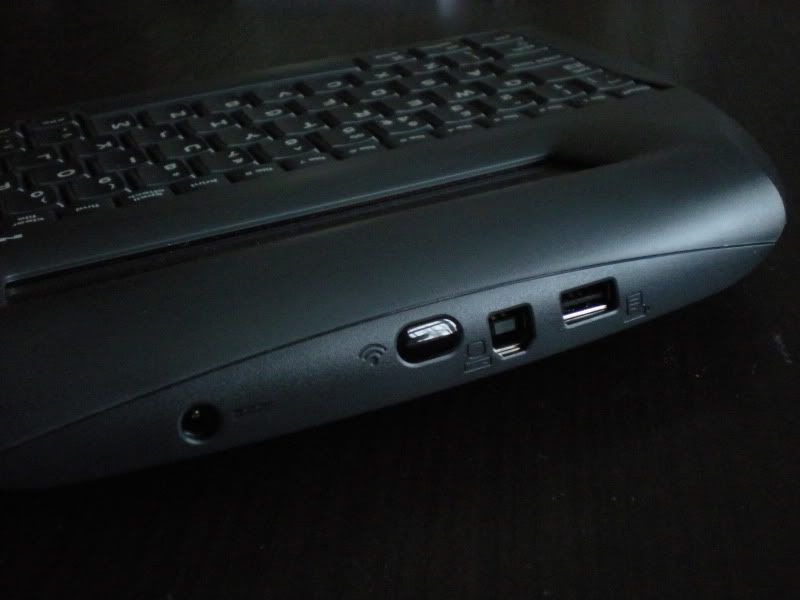
I'm typing this on an AlphaSmart Neo2.  For those who have never heard of these devices, take a look at the photos below.  It's targeted mainly at education these days, but is a supremely handy bit of kit for anybody who wants to write on the move with the minimum of fuss, wants a reasonable keyboard, doesn't care for distraction and isn't interested in a fancy finish.

The Neo2 is the most recent in a line of AlphaSmarts.  The original devices were launched in 1993 by ex-Apple employees, and the design and feature-set have remained pretty similar ever since.  Though the keyboard is about the size of those found on many laptops, the screen is monochrome and more of a letterbox than we're used to now.  It is, however, adequate for most simple typing duties, and at the moment mine is set to display six lines of text.  There's no backlight but the display is easily readable in light you'd consider fine for reading a book.

The Neo2 boots straight into a file - whichever was last open.  Files are easily opened and there are eight ready-access buttons for working on multiple documents (more can be stored on the internal memory).  Files can be transferred to or from a desktop machine via USB.  If you want, there's a wireless (IR) feature but I've never found the need to go there so can't comment.  It can also be directly connected to a USB printer.

Drafting is the real strength of the AlphaSmart. Keyboard shortcuts are plentiful, and cover common functions like copy, paste, and find.  Document statistics can be viewed, basic file management can be carried out, and there are a couple of "applets" such as a calculator and a few educational tools (typing and maths tutorials, for example) that really just belong in the classroom - again I can't comment on those as I've not used them.

There are two ways to transfer files to a computer using a standard USB cable: regurgitate a single file straight into a desktop document, or port several files at once.  The second method is slightly fiddly depending on your setup and involves some arcane kind of drag and drop that I never got the hang of, but the first is beyond simple - open your word processor of choice, and hit Send.  The AlphaSmart transmits the file as ASCII and effectively retypes it very quickly - your file appears line by line till the transfer is complete.  This can take a minute depending how much text you're transferring.  The method seems quaint and outmoded, but works.

[EDIT: it's apparent there's a newer version of the Neo Manager software than the one I was using, and that seems to have cured some of the difficulties.  Updates can be downloaded from the link below]

No drivers, third party software or special setup is needed (unless you opt for the IR transmitter), operation is mostly very simple indeed and the whole process of drafting a document is about as painless at it can be using technology.  It's certainly less painful than dragging about a laptop with a dying battery, power supply, and awkward software that runs on a grumpy OS.

Nobody is going to randomly give you flowers in the street for using an AlphaSmart.  It's not very stylish, doesn't do much and Joe Public has never heard of it.  None of that matters.  The bottom line is that it's a very handy tool for quick, simple drafting and is light (around 1kg in a slip-case and loaded with batteries), portable and easy to use.  It's also cheaper than alternative devices such as laptops and tablets - currently around £139 (ex. VAT) in the UK.  It runs on three AA batteries that give running time of around 700 hours (that's not a typo).

The fact it cannot be used to browse the web, buy things, tweet things, laugh at cats, or otherwise waste time are, for me, a boon.  If you need an all-in-one tool for these things as well as writing, perhaps this is not the device for you.  It is also little-suited to editing and re-writing, as there is no version tracking, drag and drop, pagination, or anything beyond the most basic cut & paste at hand.  Whether that is a deal-breaker depends on your own requirements.

TL;DR: I like my AlphaSmart.  Sometimes simple wins.


The AlphaSmart Neo2 and various accessories can be purchased from Renaissance Learning; a list of resellers is also available on their site.

There's also a user group over at flickr, which can be a useful source of information from experienced users.